Microsoft Copilot | AI Competency Centre

Microsoft Copilot
The AI Competency Centre site has now moved to OxIntranet. Pages on this site will no longer be maintained but will remain available until November during the transition period.
If you are a member of University staff, please visit Generative AI support (SSO required) for all the latest information about using generative AI at Oxford. Resources for current students can be found on OxWeb. If you are visiting from outside of the University, we are currently refreshing the AI content on our main website.
There are two versions of Microsoft Copilot which you can access at the University: Microsoft Copilot Chat and Microsoft 365 Copilot. When logging in with a Nexus365 account, all staff and students have access to Copilot Chat. Microsoft 365 Copilot is available via a paid bolt-on licence for staff and researchers who require AI support within apps in the Microsoft 365 suite. The features available in the University of Oxford workspace will be subject to internal governance based on business need.
Microsoft Copilot Chat: Microsoft Copilot Chat is a free limited AI tool offered by Microsoft. Unlike Microsoft 365 Copilot (paid), Microsoft Copilot Chat cannot integrate into your M365 applications and has a limited functionality.
Microsoft 365 Copilot: Microsoft 365 Copilot integrates directly into your M365 applications, using your organizational data to boost productivity. This version requires a paid licence.
Important: Copilot can only access data you already have permission to see, but it can inadvertently facilitate oversharing. A request to "summarise all Project X documents" might pull from sensitive SharePoint sites you can access but shouldn't share widely. Maintain good "permissions hygiene."
Data residency is in the Europe/EU. When considering using this tool for sensitive or specific cases we recommend you speak to your local data privacy officer.
Accessing Microsoft Copilot
- Log in to https://m365.cloud.microsoft/ through your University Nexus 365 account
- Verify full protection - Look for the green shield icon with "Protected" text
- No shield = limited protection - Without the shield, you're not in the University-protected workspace
All SSO accounts, whether using free or paid access, benefit from enterprise data protection.
Having trouble with your Microsoft 365 Copilot?
- Consider first seeking support from the company whose product you're using:
Microsoft Copilot: The Microsoft Support site can be searched to assist with queries on Copilot.
If your query is about whether an outage is affecting your connection to a particular tool, try the Microsoft Status page for Microsoft Copilot - For support accessing AI services, contact the Central IT Service Desk.
ChatGPT and Microsoft Copilot service statuses are now visible on the University's IT Services status page, under Communication and Collaboration ➡️ AI Tools. If you are struggling to access one of these services, please check this page for tool disruption.
Copilot Chat (Free)
Copilot Chat is available to all students and staff when signed in with a Nexus365 account. It provides general-purpose AI assistance grounded in the public web, with enterprise-grade data protection through Microsoft Enterprise Data Protection.
Basic features within Copilot Chat are available to all Nexus365 users:
- Web search (via Bing)
- Image generation
What Copilot Chat is good for:
- Brainstorming ideas and outlines
- Drafting emails, summaries, and explanations
- Researching topics using public sources
- Generating images for presentations and communications
- Explaining concepts step by step
- Supporting study and learning workflows
Key characteristics:
- Web-grounded (does not see internal University files unless manually uploaded)
- Accessible via browser and Microsoft Edge
- Protected by Microsoft Enterprise Data Protection when signed in (look for the green shield and "Protected" label)
- No access to emails, Teams chats, OneDrive, or SharePoint content unless manually uploaded
- Limited use of certain features per day including image generation (approximately 15 boosts per day via a credit system)
🔗How Copilot Chat works with and without a Microsoft 365 Copilot licence.
Microsoft 365 Copilot (Paid)
Microsoft 365 Copilot is a paid bolt-on licence that integrates Copilot directly into Word, Excel, PowerPoint, Outlook, Teams, and OneNote.
Licences for Microsoft 365 Copilot are managed by IT Services. For new applications, renewals, or queries about purchasing an M365 Copilot licence, please contact nexus365licensing@it.ox.ac.uk or fill out the Nexus365 bolt-on licence request form found on the Nexus365 bolt-on licencing webpage.
What the paid version adds
The paid licence provides:
- Direct access to files, emails, meetings, and chats the user already has permission to see
- In-app assistance across Microsoft 365 applications
- Advanced reasoning agents for research and data analysis
- Priority access to the latest models during peak demand
- Increased image generation capacity
- Expanded file upload capabilities within storage limits
Important: Copilot has access to all data in Sharepoint to which you have access with your Microsoft 365 (Nexus 365) account. This may occasionally include files to which you may have been given access by accident - if you discover any such files, please notify their owners or, if appropriate, the Information Security team. You can also ask about your emails and your chats in Teams.
Microsoft 365 Copilot features
Paid Microsoft 365 Copilot users have access to everything in Copilot Chat plus the following advanced capabilities:
Analyst agent
- Assists with cleaning up datasets
- Analyses multiple files together
- Generates Python code for transparency
- Supports reproducible, auditable analysis
🔗Get started with Analyst in Microsoft 365 Copilot
Researcher agent
- Synthesises information from emails, files, meetings, and the web
- Produces structured reports with citations
- Uses iterative reasoning for higher accuracy and completeness
- Suitable for literature reviews, briefings, and grant preparation
🔗Get started with Researcher in Microsoft 365 Copilot
Copilot Pages
Turn chat outputs into shareable documents. You can edit collaboratively without sharing private chat history. Useful for drafting and iterative writing.
🔗Get started with Microsoft 365 Copilot Pages
Copilot Notebooks
Workspaces that let you gather all relevant project content (chats, files, notes, links) in one place and ask Copilot questions or generate outputs grounded in that curated material. They support real-time collaboration and dynamically update references as your work evolves.
🔗Get started with Microsoft 365 Copilot Notebooks
Copilot agents
Agents extend what you can do with Microsoft 365 Copilot - you can customize your Copilot experience by connecting to your organisation’s knowledge and data sources, as well as by automating and executing business processes.
🔗Get started with agents in Microsoft 365 Copilot
Explore different prompts
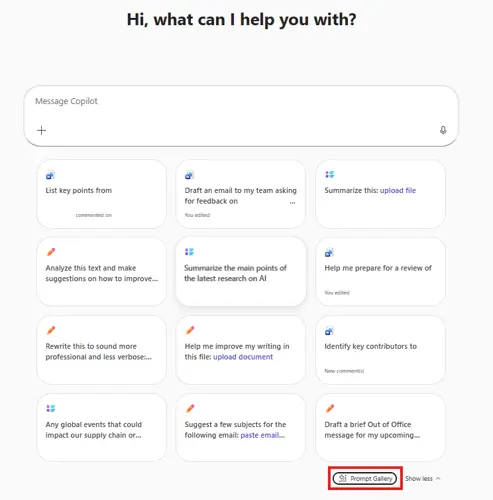
Explore the Copilot Prompt Gallery to get ideas for the sort of things you can ask Microsoft 365 Copilot to do for you. You can access the Prompt Gallery in the Microsoft Copilot Chat interface:
Direct integration with Microsoft 365 applications:
Important: Copilot is only available in Microsoft 365 desktop apps including Outlook, Word, Powerpoint, and Excel and in their online versions.
Copilot is not available in desktop apps of Office 2021
Word
- Draft documents from multiple internal sources
- Rewrite, summarise, and restructure long texts
- Reference up to 20 internal files in one prompt
- Support structured academic and administrative writing
🔗Copilot in Word help & learning
Excel
- Ask questions about datasets in natural language
- Identify trends, anomalies, and correlations
- Use the Analyst agent for Python-based analysis
🔗Copilot in Excel help & learning
PowerPoint
- Generate presentation outlines and content from internal documents
- Note: Performance on document generation and editing remains inconsistent
🔗Copilot in PowerPoint help & learning
Outlook
- Draft emails and responses based on context from meetings and documents
- Note: Cannot be used with shared inboxes or process large quantities of emails autonomously
🔗 Copilot in Outlook help & learning
Teams
- Generate meeting summaries and action lists
- Catch up on missed meetings using transcripts (Note: Meeting transcription requires separate Oxford approval)
- Ask questions during meetings
🔗 Generating instant meeting minutes with Copilot and other Teams features
Copilot in other Microsoft products
You may also want to explore Copilot in other Microsoft products: